







This comprehensive guide compares the three main types of touchscreen technologies: capacitive, resistive, and infrared touchscreens. Discover how each technology works, their advantages and disadvantages, ideal applications, and which type is best suited for your specific needs. Whether you're selecting displays for retail POS systems, gaming, industrial automation, or interactive kiosks, this detailed comparison will help you make an informed decision.
Touchscreen technology has revolutionized how we interact with digital devices, from smartphones and tablets to digital signage and industrial control systems. Understanding the fundamental differences between touchscreen types is crucial for selecting the right technology for your application.
Each touchscreen technology—capacitive, resistive, and infrared—offers unique characteristics that make them suitable for different environments and use cases. This guide provides an in-depth comparison to help you understand which technology aligns best with your requirements.
Understanding Touchscreen Technology Fundamentals
Before diving into specific comparisons, it's essential to understand how touchscreen technologies detect and respond to touch input. Each technology uses different physical principles to identify touch points, which directly impacts their performance, durability, and cost.
Touchscreen technologies can be broadly categorized based on their detection method: some rely on electrical properties (capacitive, resistive), while others use optical or acoustic principles (infrared, surface acoustic wave). The choice of technology affects everything from multi-touch capabilities to environmental resistance.
Capacitive Touchscreens
How Capacitive Touchscreens Work
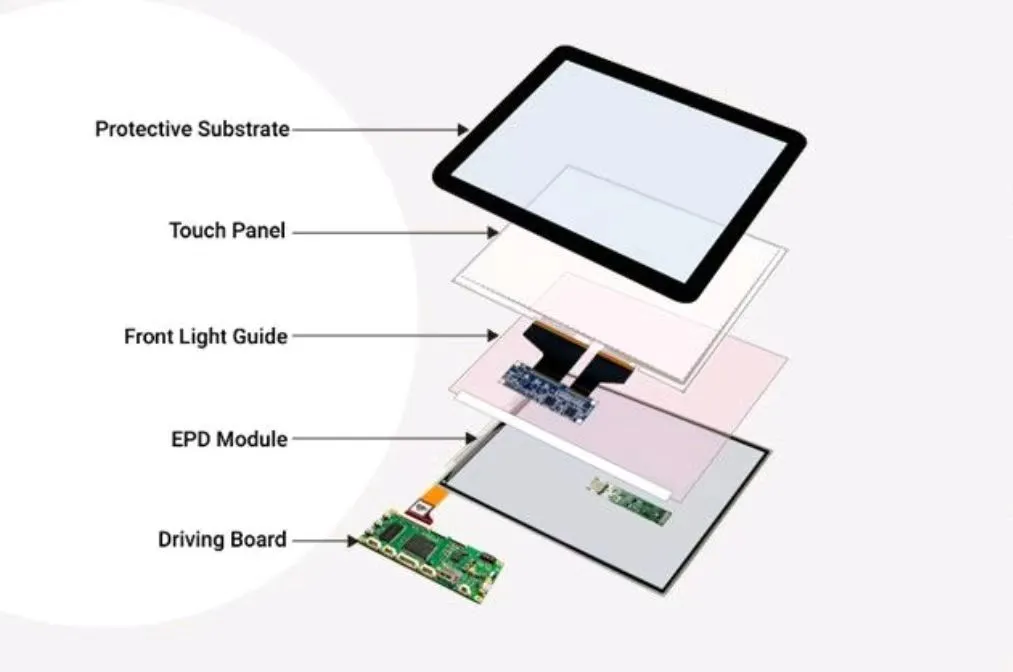
Capacitive touchscreens detect touch through changes in electrical capacitance. The screen is coated with a transparent conductive material, typically indium tin oxide (ITO). When a conductive object (like a human finger) touches the screen, it disrupts the screen's electrostatic field, creating a measurable change in capacitance at that point.
There are two main types of capacitive touch technology:
- Surface Capacitive: Uses a single layer of conductive material. The touch controller measures capacitance changes at the four corners of the screen to determine touch location.
- Projected Capacitive (PCAP): Uses a grid of electrodes (transparent conductors) arranged in rows and columns. This allows for multi-touch detection and higher accuracy. PCAP is the most common type in modern devices.
Advantages of Capacitive Touchscreens
Capacitive touchscreens offer several key advantages:
- Superior Multi-Touch: Supports multiple simultaneous touch points, enabling gestures like pinch-to-zoom and rotation
- High Clarity: Glass surface provides excellent optical clarity and scratch resistance
- Fast Response: Very low latency, providing immediate feedback
- Durability: Glass surface is highly durable and resistant to scratches
- No Pressure Required: Light touch is sufficient, reducing user fatigue
- Excellent for Mobile: Ideal for smartphones, tablets, and modern consumer devices
Disadvantages of Capacitive Touchscreens
However, capacitive technology also has limitations:
- Requires Conductive Input: Doesn't work with gloves (unless special capacitive gloves) or non-conductive styluses
- Higher Cost: More expensive than resistive touchscreens
- Environmental Sensitivity: Can be affected by water, moisture, or electrical interference
- Limited Stylus Options: Requires special capacitive styluses
- Not Ideal for Industrial: May not work well in harsh industrial environments
Best Applications for Capacitive Touchscreens
Capacitive touchscreens excel in:
- Consumer Electronics: Smartphones, tablets, smartwatches
- Retail POS Systems: Modern point-of-sale terminals
- Digital Signage: Interactive displays in retail and public spaces
- Gaming: Touch-enabled gaming devices and arcade machines
- Professional Displays: Design workstations and creative applications
Resistive Touchscreens
How Resistive Touchscreens Work
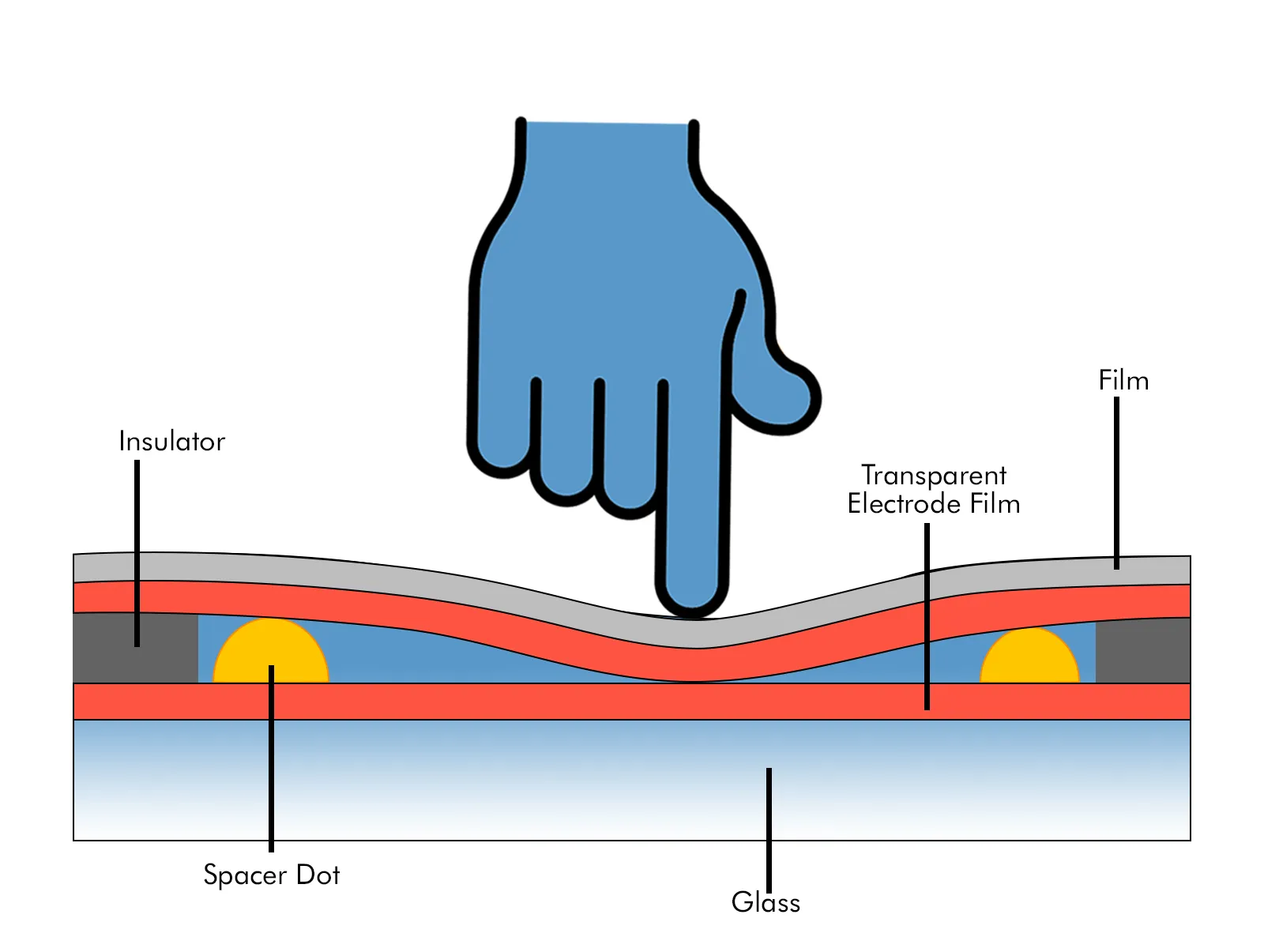
Resistive touchscreens consist of two flexible layers separated by a small gap. The top layer is typically made of flexible plastic, while the bottom layer is usually glass or rigid plastic. Both layers are coated with a transparent resistive material. When pressure is applied, the two layers make contact, creating a voltage divider that allows the controller to determine the touch coordinates.
There are several types of resistive touchscreens:
- 4-Wire Resistive: Most common and cost-effective, suitable for basic applications
- 5-Wire Resistive: More durable, with the bottom layer handling all sensing. Better for industrial applications
- 8-Wire Resistive: Highest accuracy, used in applications requiring precise input
Advantages of Resistive Touchscreens
Resistive touchscreens offer unique benefits:
- Universal Input: Works with any object—finger, stylus, gloved hand, or pen
- Cost-Effective: Lower manufacturing cost makes it ideal for budget-conscious projects
- Durable in Harsh Conditions: Resistant to dust, moisture, and contaminants
- Precise Input: Excellent for applications requiring precise stylus input
- No Calibration Issues: Less sensitive to environmental factors
- Ideal for Industrial Use: Works well in manufacturing and industrial environments
Disadvantages of Resistive Touchscreens
Resistive technology has some drawbacks:
- Limited Multi-Touch: Typically supports only single-touch (some support dual-touch)
- Lower Clarity: Multiple layers reduce optical clarity compared to capacitive
- Requires Pressure: Needs firm pressure, which can cause user fatigue
- Wear Over Time: Flexible top layer can wear with heavy use
- Slower Response: Generally slower than capacitive touchscreens
- Outdated for Consumer: Less common in modern consumer devices
Best Applications for Resistive Touchscreens
Resistive touchscreens are best suited for:
- Industrial Control Systems: Manufacturing equipment, automation panels
- Medical Devices: Equipment requiring gloved operation
- Outdoor Kiosks: Applications exposed to weather and contaminants
- Point-of-Sale Systems: Traditional POS terminals
- Automotive: In-vehicle infotainment systems
- Budget-Conscious Projects: Where cost is a primary consideration
Infrared Touchscreens
How Infrared Touchscreens Work
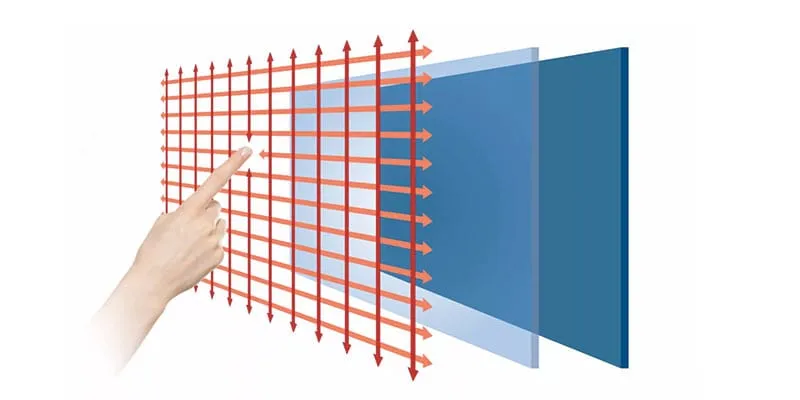
Infrared (IR) touchscreens use an array of infrared LEDs and photodetectors arranged around the edges of the display. The LEDs emit infrared light that creates an invisible grid of light beams across the screen surface. When an object touches the screen, it interrupts the infrared beams, and the photodetectors identify which beams are blocked, allowing the controller to calculate the touch coordinates.
There are two main IR touchscreen configurations:
- Frame-Based IR: LEDs and sensors are mounted in a frame around the display
- In-Glass IR: IR components are integrated directly into the glass substrate
Advantages of Infrared Touchscreens
Infrared touchscreens provide several advantages:
- Universal Input: Works with any object, including gloved hands
- Excellent Clarity: No overlay means 100% optical clarity
- Large Screen Support: Ideal for displays 32 inches and larger
- Durable Surface: The display glass itself is the touch surface
- Multi-Touch Capable: Supports multiple simultaneous touches
- Resistant to Surface Damage: No delicate layers to damage
- Ideal for Public Displays: Excellent for kiosks and digital signage
Disadvantages of Infrared Touchscreens
Infrared technology has some limitations:
- Environmental Sensitivity: Can be affected by direct sunlight or bright ambient light
- Dust and Debris: Particles on the screen can cause false touches
- Higher Cost: More expensive than resistive, comparable to capacitive
- Bezel Requirements: Requires space around the display for IR components
- Not Ideal for Small Screens: Less practical for displays under 20 inches
- Calibration Needed: May require periodic calibration
Best Applications for Infrared Touchscreens
Infrared touchscreens are perfect for:
- Large Format Displays: Digital signage, video walls (32" and larger)
- Interactive Kiosks: Public information displays, wayfinding systems
- Collaborative Workspaces: Interactive whiteboards, conference room displays
- Retail Environments: Large touch displays for product exploration
- Education: Interactive learning displays and smart boards
- Gaming and Entertainment: Large interactive gaming displays
Head-to-Head Comparison
To help you make the best decision, here's a comprehensive comparison table of the three technologies across key factors:
| Feature | Capacitive | Resistive | Infrared |
|---|---|---|---|
| Input Method | Finger or capacitive stylus only | Any object (finger, stylus, gloved hand, pen) | Any object (finger, stylus, gloved hand) |
| Multi-Touch | 10+ simultaneous touches |
1-2 touches (single-touch typical) |
Multiple simultaneous touches |
| Optical Clarity | High transparency |
Reduced due to multiple layers |
100% clarity (no overlay) |
| Durability | Glass surface, scratch-resistant |
Top layer can wear over time |
Display glass is touch surface |
| Cost | Premium pricing |
Most cost-effective (30-50% less) |
Varies with screen size |
| Response Time | Low latency |
Slower than capacitive |
Good responsiveness |
| Environmental Resistance | Sensitive to water/moisture |
Resistant to dust, moisture, contaminants |
Sensitive to direct sunlight |
| Screen Size Range | Small to Large All sizes supported |
Small to Medium Best for smaller displays |
Large (20"+) Ideal for large format |
| Pressure Required | Light touch No pressure needed |
Firm pressure Requires pressure to activate |
Light touch No pressure needed |
| Best For | Consumer devices, modern POS, mobile devices | Industrial, medical, budget projects, harsh environments | Large displays, kiosks, digital signage, public spaces |
Which Touchscreen Type Should You Choose?
Choose Capacitive If:
- You need advanced multi-touch gestures (pinch, zoom, rotate)
- Your application targets modern consumer devices
- Optical clarity is critical
- Users will interact with bare fingers
- You need fast, responsive touch input
- Budget allows for premium technology
Choose Resistive If:
- Users need to interact with gloved hands
- Your application is in a harsh industrial environment
- Cost is a primary consideration
- You need precise stylus input
- Multi-touch is not required
- Durability in challenging conditions is essential
Choose Infrared If:
- You're deploying large format displays (32"+)
- Maximum optical clarity is required
- Users need to interact with various objects
- Your application is for public kiosks or digital signage
- Surface durability is critical
- You need multi-touch on large screens
Cost Considerations
Cost is often a deciding factor in touchscreen selection. Resistive touchscreens are the most cost-effective, typically 30-50% less than capacitive options. Capacitive touchscreens command premium pricing, especially for multi-touch PCAP technology. Infrared touchscreens fall in the moderate to high cost range, with pricing varying significantly based on screen size.
However, consider total cost of ownership, not just initial purchase price. Factors like durability, maintenance requirements, and replacement costs should influence your decision. A more expensive but more durable solution may provide better long-term value.
Future Trends in Touchscreen Technology
The touchscreen industry continues to evolve with new technologies emerging:
- In-Cell Touch: Integrating touch sensors directly into display panels for thinner, lighter devices
- Force Touch: Detecting pressure levels in addition to touch location
- Hover Detection: Responding to proximity without physical contact
- Flexible Displays: Bendable and foldable touchscreen technologies
These advancements are expanding the possibilities for touch interaction while addressing limitations of current technologies.
Selecting the right touchscreen technology depends on your specific application requirements, user interaction patterns, environmental conditions, and budget constraints. Capacitive touchscreens excel in modern consumer applications requiring multi-touch, resistive touchscreens are ideal for industrial and cost-sensitive projects, and infrared touchscreens are perfect for large-format public displays.
Consider all factors—input methods, environmental conditions, screen size, multi-touch needs, and budget—when making your decision. The right choice will provide optimal user experience, durability, and value for your specific application.
As touchscreen technology continues to advance, we can expect even more sophisticated solutions that combine the best features of different technologies while addressing their limitations. Staying informed about these developments will help you make better decisions for future projects.